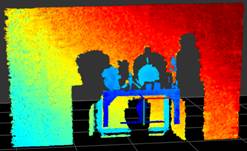
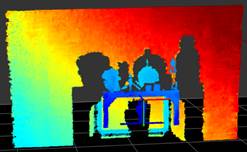
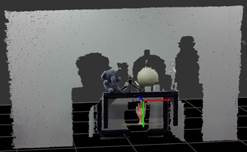
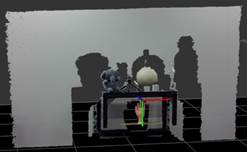
使用深度后处理模块
版本:V3.1
1
滤波说明
深度后处理滤波模块的实现包含在Orbbec SDK中,用于提升深度质量,减少飞点噪声。各滤波器均被封装成单独的数据帧处理模块,可以独立地被用户创建和调用。
1.1
下采样滤波-Decimation Filter
1.1.1
功能
该滤波器的降采样核尺寸范围从[2x2]到[8x8]像素。图像尺寸可以分别在x-y两个维度上按比例缩小,以保持纵横比。应用该滤波器之后,深度数据的相关参数也会重新计算以适配数据的分辨率变化。该滤波器还具有一些填充空洞的能力,因为该滤波器仅使用有效像素即非零像素。
1.1.2
参数
|
参数 |
操作 |
参数范围 |
参数类型 |
默认值 |
|
Scale Range |
线性比例因子 |
[1, 8] |
整型 |
2 |
1.1.3
数据域
应用在深度图和视差图上。
1.2
HDR 融合-HDR Merge Filter
1.2.1
功能
该滤波器与深度HDR功能一起使用。通过合并不同曝光时间的连续深度图像,可以克服拍摄低照度和高照度场景时深度缺失较多的挑战。
1.2.2
数据域
应用在深度图和视差图上。
1.3
帧序滤波器-Sequence ID Filter
1.3.1
功能
该滤波器与深度HDR功能联合使用(需要关闭HDR Merge Filter),并仅输出具有指定序列ID的数据流。
1.3.2
参数
|
参数 |
操作 |
参数范围 |
参数类型 |
默认值 |
|
Sequence ID |
所选序列的ID |
[0, 1] |
整型 |
1 |
1.3.3
数据域
应用在深度图和视差图上。
1.4
截断滤波-Threshold Filter
1.4.1
功能
该滤波器仅保留用户所感兴趣范围内的深度值,将超出范围的深度值置为0。深度阈值Min和Max都以mm作为单位。因此,该截断滤波器仅可以在深度图上操作。如果输入为视差图,该滤波器不生效。
1.4.2
参数
|
参数 |
操作 |
参数范围 |
参数类型 |
默认 |
|
Min |
最小深度值 |
[0-16000] |
整型 |
0 |
|
Max |
最大深度值 |
[ 0-16000] |
整型 |
16000 |
1.4.3
数据域
只应用于深度图
1.5
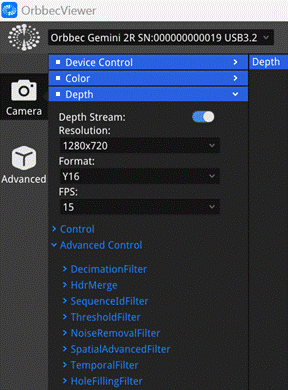
去噪滤波-Noise Removal Filter
1.5.1
功能
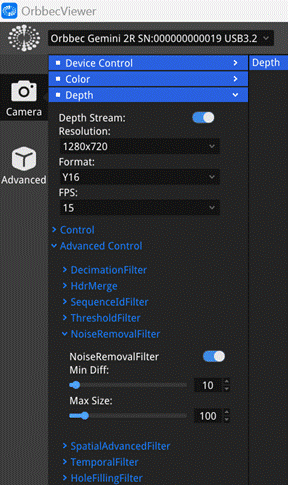
该滤波器可以去除噪点像素,减少图像飞点,但在一定程度上会降低深度图的填充率。参数Min Diff和Max Size可以用于调节滤波效果,Min Diff是调节深度空间滤波范围的参数,较大的Min Diff值的去噪效果更差。Max
Size是用于判断噪声和非噪声的参数,较大的Max Size值的去噪效果更好,滤波后的深度图飞点越少,但深度填充率会降低。
1.5.2
参数
|
参数 |
操作 |
参数范围 |
参数类型 |
默认值 |
|
Min Diff |
深度空间滤波范围 |
[1-51200] |
整型 |
256 |
|
Max Size |
噪声的最大尺寸 |
[1-1000] |
整型 |
80 |
1.5.3
数据域
应用在深度图和视差图上。
1.6
空域滤波 -Spatial
Filter
1.6.1
功能
该滤波器根据指定的Magnitude参数执行多次迭代处理,以增强深度数据的平滑度,且能够填充深度图中的小面积的深度空洞。Alpha参数用来确定平滑程度。此外,该滤波器还具有平滑保留边缘的效果,Diff
Threshold参数用于区分平滑区和边缘区。Magnitude参数定义了迭代次数。Radius表示在每次迭代中,使用指定半径邻域内的有效像素来填充孔洞。
1.6.2
参数
|
参数 |
操作 |
参数范围 |
参数类型 |
默认 |
|
Alpha |
当前像素值的权重 |
[0.1-1] |
浮点 |
0.5 |
|
Diff Threshold |
非边缘过渡的阈值 |
[1-51200] |
整型 |
160 |
|
Magnitude |
滤波迭代的次数 |
[1-5] |
整型 |
1 |
|
Radius |
深度图中要填充的孔洞的最大半径 |
[0-8] |
整型 |
1 |
1.6.3
数据域
应用在深度图和视差图上。
1.7
时域滤波-Temporal
Filter
1.7.1
功能
在时间维度上对图像滤波,适用于需要时间稳定性的场景、静态场景中使用。Diff Threshold越大,帧间数据平滑增强,滤波后的帧间差异越小;Weight越大,将保留更多当前帧的数据信息。
1.7.2
参数
|
参数 |
操作 |
参数范围 |
参数类型 |
默认 |
|
Diff Threshold |
静态深度像素的最大帧间差异 |
[0.1-1] |
浮点 |
0.1 |
|
Weight |
当前帧值的权重 |
[0.1-1] |
浮点 |
0.4 |
1.7.3
数据域
应用在深度图和视差图上。
1.8
填洞滤波-Hole Filling Filter
1.8.1
功能
该滤波器使用指定深度填充方式来填充图像中的所有空洞。
1.8.2
参数
|
参数 |
操作 |
范围 |
默认 |
|
HoleFillingMode |
填洞类型选择 |
Farthest / Nearest / Top |
Farthest |
1.8.3
数据域
应用在深度图和视差图上。
2
注意事项
● 各后处理模块内部自动完成帧内存及其生命周期管理,并提供同步和异步调用接口。
● 所有后处理滤波器都能够接收和处理来自不同数据流的数据帧,但是出于以下原因考虑,建议为各路数据流建立和维护独立的后处理模块:
○ 每次识别到新的帧类型/数据流时都会产生性能开销,因为某些滤波器需要重新初始化。
○ 时间滤波器的效果依赖于历史帧的保留。切换帧源会使保留的历史无效,并使滤波器失效。
3
应用示例
3.1
推荐方案
● 推荐滤波调用的流程如下:

❏ 深度帧(Depth
Frame):必选,用于后处理的输入深度帧。
❏ 下采样滤波(Decimation Filter):可选,通过对深度图进行下采样来减少复杂度并丢失深度细节。
❏ HDR融合(HDR
Merge Filter):可选,与深度HDR功能结合,合并交替曝光值得连续深度图像。
❏ 帧序滤波(Sequence
ID Filter):可选,与深度HDR功能结合,选择特定序列。
❏ 截断滤波(Threshold Filter):可选,保留感兴趣的深度值并省略超出范围的深度值。
❏ 去噪滤波(Noise
Removal Filter):必选,去除散射深度像素。
❏ 空域滤波(Spatial Filter):可选,在保留边缘信息的同时空间平滑相邻深度像素。
❏ 时域滤波(Temporal Filter):可选,暂时平滑深度值以改善它们的时间一致性。
❏ 填洞滤波(Hole
Filling Filter):不推荐,从邻域像素中恢复缺失的深度值。
❏ 输出(Filtered
Depth):后处理后的输出深度帧。
● Orbbec SDK 和 Orbbec
Viewer 中后处理滤波器的默认设置如下:
|
滤波器 |
默认设置 |
|
|
状态 |
参数 |
|
|
下采样滤波 |
关闭 |
Scale Range = 2 |
|
HDR融合 |
关闭 |
N/A |
|
帧序滤波 |
关闭 |
Sequence ID = 1 |
|
截断滤波 |
关闭 |
Min = 0 Max = 16000 |
|
去噪滤波 |
开启 |
Max Disp
Diff = 256 Max Size = 80 |
|
空域滤波 |
关闭 |
Alpha = 0.5 Diff Threshold = 160 Magnitude = 1 Radius = 1 |
|
时域滤波 |
关闭 |
Diff Threshold = 0.1 Weight = 0.4 |
|
填洞滤波 |
关闭 |
Mode =Farthest |
3.2
Orbbec
Viewer
|
Orbbec Viewer - 后处理滤波器 |
|
|
|
|
3.3
Orbbec
SDK
3.1
C API 及代码参考
该部分仅描述了两个后处理滤波器的接口。其他滤波器的接口,请参阅libobsensor\h\Filter.h:
// header file: libobsensor\h\Filter.h
/**
* @brief Create a decimation
filter.
* @param[out] error Log error
messages.
* @return A depth_filter
object.
*/
ob_filter *ob_create_decimation_filter(ob_error **error);
/**
* @brief Get the decimation filter
scale range.
*
* @param[in] filter A decimation
filter object.
* @param[out] error Log error
messages.
*/
ob_uint8_property_range ob_decimation_filter_get_scale_range(ob_filter *filter, ob_error
**error);
/**
* @brief Set the decimation filter
scale value.
*
* @param[in] filter A decimation
object.
* @param[in] value decimation
filter scale value.
* @param[out] error Log error
messages.
*/
void ob_decimation_filter_set_scale_value(ob_filter *filter, uint8_t value, ob_error
**error);
/**
* @brief Get the decimation filter
scale value.
*
* @param[in] filter A decimation
object.
* @param[out] error Log error
messages.
* @return decimation filter scale
value.
*/
uint8_t ob_decimation_filter_get_scale_value(ob_filter *filter, ob_error
**error);
// header file: libobsensor\h\Filter.h
/**
* @brief Create a noise removal
filter.
* @param[out] error Log error
messages.
* @return A depth_filter
object.
*/
ob_filter *ob_create_noise_removal_filter(ob_error **error);
/**
* @brief Get the noise removal
filter disp diff range.
*
* @param[in] filter A noise removal
filter object.
* @param[out] error Log error
messages.
* @return ob_uint16_property_range
the disp_diff value of property range.
*/
ob_uint16_property_range ob_noise_removal_filter_get_disp_diff_range(ob_filter *filter, ob_error
**error);
/**
* @brief Get the noise removal
filter max size range.
*
* @param[in] filter noise removal
filter object.
* @param[out] error Log error
messages.
* @return ob_int_property_range
the _max_size value of property range.
*/
ob_int_property_range ob_noise_removal_filter_get_max_size_range(ob_filter *filter, ob_error
**error);
/**
* @brief Set the noise removal
filter params.
*
* @param[in] filter noise removal
filter object.
* @param[in] params ob_noise_removal_filter_params.
* @param[out] error Log error
messages.
*/
void ob_noise_removal_filter_set_filter_params(ob_filter *filter, ob_noise_removal_filter_params
params, ob_error **error);
/**
* @brief Get the noise removal
filter params.
*
* @param[in] filter noise removal
filter object.
* @param[out] error Log error
messages.
* @return ob_noise_removal_filter_params.
*/
ob_noise_removal_filter_params ob_noise_removal_filter_get_filter_params(ob_filter *filter, ob_error
**error);
#include "window.hpp"
#include <iostream>
extern "C" {
#include <stdlib.h>
#include <libobsensor/h/Error.h>
#include <libobsensor/h/Frame.h>
#include <libobsensor/h/ObTypes.h>
#include <libobsensor/h/Pipeline.h>
#include <libobsensor/h/StreamProfile.h>
#include <libobsensor/h/Device.h>
}
/*
*This sample is written in C++
code, based on the C language version API of OrbbecSDK.
*/
void check_error(ob_error
*error) {
if(error) {
printf("ob_error
was raised: \n\tcall: %s(%s)\n", ob_error_function(error), ob_error_args(error));
printf("\tmessage:
%s\n", ob_error_message(error));
printf("\terror type: %d\n", ob_error_exception_type(error));
ob_delete_error(error);
exit(EXIT_FAILURE);
}
}
int main(int argc, char **args)
{
Window *win = nullptr; //
render window, based on opencv
ob_error *error = NULL; // Used to return SDK
interface error information
ob_pipeline
*pipeline = nullptr; // pipeline, used to open the depth
stream after connecting the device
// Create a pipeline
to open the depth stream after connecting the device
pipeline = ob_create_pipeline(&error);
check_error(error);
// Create config to
configure the resolution, frame rate, and format of the depth stream
ob_config
*config = ob_create_config(&error);
check_error(error);
// Configure the depth
stream
ob_stream_profile *depth_profile = NULL;
ob_stream_profile_list
*profiles =
ob_pipeline_get_stream_profile_list(pipeline,
OB_SENSOR_DEPTH, &error);
check_error(error);
// Find the
corresponding profile according to the specified format, first look for the y16
format
depth_profile
= ob_stream_profile_list_get_video_stream_profile(profiles,
640, OB_HEIGHT_ANY, OB_FORMAT_Y16, 30, &error);
// If the specified
format is not found, search for the default profile to open the stream
if(error) {
depth_profile = ob_stream_profile_list_get_profile(profiles,
OB_PROFILE_DEFAULT, &error);
ob_delete_error(error);
error = nullptr;
}
// enable stream
ob_config_enable_stream(config,
depth_profile, &error);
check_error(error);
ob_filter*
dec_filter = ob_create_decimation_filter(&error);
check_error(error);
//When the value is
set to 1, it indicates no decimation.
ob_decimation_filter_set_scale_value(dec_filter, 1, &error);
check_error(error);
//Create noiseRemovalFilter
ob_filter
*noise_filter = ob_create_noise_removal_filter(&error);
check_error(error);
//Get the dispDiff range, it includes maximum, minimum, step size,
current, and default values.
ob_uint16_property_range disp_diff_range = ob_noise_removal_filter_get_disp_diff_range(noise_filter, &error);
check_error(error);
//Get the disp maxSize range,it
includes maximum, minimum, step size, current, and default values.
ob_int_property_range
max_size_range = ob_noise_removal_filter_get_max_size_range(noise_filter, &error);
check_error(error);
ob_noise_removal_filter_params
filter_params = ob_noise_removal_filter_get_filter_params(noise_filter, &error);
check_error(error);
//Assign values based
on the range of dispDiff.
filter_params.disp_diff
= 10;
//Assign values based
on the range of maxSize.
filter_params.max_size
= 100;
//set params
ob_noise_removal_filter_set_filter_params(noise_filter, filter_params,
&error);
check_error(error);
std::vector<ob_filter *> ob_filters;
ob_filters.push_back(dec_filter);
ob_filters.push_back(noise_filter);
// Start the pipeline
with config
ob_pipeline_start_with_config(pipeline,
config, &error);
check_error(error);
// Create a window for
rendering, and set the resolution of the window
uint32_t width = ob_video_stream_profile_width(depth_profile,
&error);
check_error(error);
uint32_t height = ob_video_stream_profile_height(depth_profile,
&error);
check_error(error);
win = new
Window("DepthViewer", width, height);
check_error(error);
bool resize_win = ob_filter_is_enable(dec_filter, &error);
check_error(error);
// Wait in a loop,
exit after the window receives the "esc" key
while(*win) {
// Wait for up to 100ms for a frameset in blocking mode.
ob_frame *frameset = ob_pipeline_wait_for_frameset(pipeline,
100, &error);
check_error(error);
if(frameset == nullptr) {
continue;
}
ob_frame *depth_frame
= ob_frameset_depth_frame(frameset, &error);
check_error(error);
if(depth_frame != nullptr)
{
for(ob_filter *filter: ob_filters)
{
depth_frame = ob_filter_process(filter,
depth_frame, &error);
check_error(error);
}
}
uint32_t width, height;
if(depth_frame != nullptr)
{
// for Y16 format depth frame, print the distance of the center pixel
every 30 frames
uint32_t index = ob_frame_index(depth_frame, &error);
check_error(error);
ob_format format = ob_frame_format(depth_frame, &error);
check_error(error);
if(index % 30 == 0 && format == OB_FORMAT_Y16) {
uint32_t width = ob_video_frame_width(depth_frame, &error);
check_error(error);
uint32_t height = ob_video_frame_height(depth_frame, &error);
check_error(error);
float scale = ob_depth_frame_get_value_scale(depth_frame, &error);
check_error(error);
uint16_t *data = (uint16_t *)ob_frame_data(depth_frame, &error);
check_error(error);
// pixel value multiplied by scale is the actual distance value in
millimeters
float center_distance = data[width * height /
2 + width / 2] * scale;
// attention: if the distance is 0, it means that the depth camera
cannot detect the object(may be out of detection
range)
printf("Facing an object %.2f mm
away.\n", center_distance);
}
if(resize_win) {
uint32_t width = ob_video_frame_width(depth_frame, &error);
check_error(error);
uint32_t height = ob_video_frame_height(depth_frame, &error);
check_error(error);
win->resize(width, height);
resize_win = false;
}
// add frame to render
// attention: the frame will be released inside the window,for user's code should release it by call ob_delete_frame()
win->addToRender(depth_frame);
}
ob_delete_frame(frameset, &error);
check_error(error);
};
for(ob_filter *filter: ob_filters) {
ob_delete_filter(filter, &error);
check_error(error);
}
// stop the pipeline
ob_pipeline_stop(pipeline,
&error);
check_error(error);
// destroy the window
delete win;
// destroy profile
ob_delete_stream_profile(depth_profile, &error);
check_error(error);
// destroy profile
list
ob_delete_stream_profile_list(profiles,
&error);
check_error(error);
// destroy the
pipeline
ob_delete_pipeline(pipeline,
&error);
check_error(error);
return 0;
}
3.2
C++API 及代码参考
该部分仅描述了两个后处理滤波器的接口。其他滤波器的接口,请参阅libobsensor\hpp\Filter.hpp:
// header file: libobsensor\hpp\Filter.hpp
/**
* @brief Decimation filter,reducing complexity by subsampling depth maps
* and losing depth details.
*/
class OB_EXTENSION_API DecimationFilter : public
Filter {
public:
DecimationFilter();
/**
* @brief Set the
decimation filter scale value.
*
* @param type
The decimation filter scale value.
*/
void setScaleValue(uint8_t value);
/**
* @brief Get the
decimation filter scale value.
*/
uint8_t getScaleValue();
/**
* @brief Get the
property range of the decimation filter scale value.
*/
OBUint8PropertyRange getScaleRange();
};
// header file: libobsensor\hpp\Filter.hpp
/**
* @brief The noise removal filter,
removing scattering depth pixels.
*/
class OB_EXTENSION_API NoiseRemovalFilter : public
Filter {
public:
NoiseRemovalFilter();
/**
* @brief Set the
noise removal filter params.
*
* @param[in]
params ob_noise_removal_filter_params.
*/
void setFilterParams(OBNoiseRemovalFilterParams
filterParams);
/**
* @brief Get the
noise removal filter params.
*
* @return OBNoiseRemovalFilterParams.
*/
OBNoiseRemovalFilterParams
getFilterParams();
/**
* @brief Get the
noise removal filter disp diff range.
* @return
OBUint16PropertyRange The disp diff of property
range.
*/
OBUint16PropertyRange getDispDiffRange();
/**
* @brief Get the
noise removal filter max size range.
* @return
OBUint16PropertyRange The max size of property range.
*/
OBUint16PropertyRange getMaxSizeRange();
};
#include "window.hpp"
#include "libobsensor/hpp/Pipeline.hpp"
#include "libobsensor/hpp/Error.hpp"
int main(int argc, char **argv)
try {
// Create a pipeline
with default device
ob::Pipeline
pipe;
// Get all stream
profiles of the depth camera, including stream resolution, frame rate, and
frame format
auto profiles = pipe.getStreamProfileList(OB_SENSOR_DEPTH);
std::shared_ptr<ob::VideoStreamProfile> depthProfile
= nullptr;
try {
// Find the corresponding profile according to the specified format,
first look for the y16 format
depthProfile = profiles->getVideoStreamProfile(640, OB_HEIGHT_ANY, OB_FORMAT_Y16,
30);
}
catch(ob::Error &e) {
// If the specified format is not found, search for the default profile
to open the stream
depthProfile =
std::const_pointer_cast<ob::StreamProfile>(profiles->getProfile(OB_PROFILE_DEFAULT))->as<ob::VideoStreamProfile>();
}
// By creating config
to configure which streams to enable or disable for the pipeline, here the
depth stream will be enabled
std::shared_ptr<ob::Config>
config = std::make_shared<ob::Config>();
config->enableStream(depthProfile);
ob::DecimationFilter decFilter;
// When the value is
set to 1, it indicates no decimation.
decFilter.setScaleValue(1);
ob::NoiseRemovalFilter noiseFilter;
//open it
noiseFilter.enable(true);
//Get the dispDiff range, it includes maximum, minimum, step size,
current, and default values.
OBUint16PropertyRange dispDiffRange = noiseFilter.getDispDiffRange();
//Get the disp maxSize range,it
includes maximum, minimum, step size, current, and default values.
OBUint16PropertyRange dispMaxSizeRange = noiseFilter.getMaxSizeRange();
OBNoiseRemovalFilterParams
filterParams = noiseFilter.getFilterParams();
//Assign values based
on the range of dispDiff.
filterParams.disp_diff
= 10;
//Assign values based
on the range of maxSize.
filterParams.max_size
= 100;
//set params
noiseFilter.setFilterParams(filterParams);
//Add filter to list
std::vector<ob::Filter> postFilters;
postFilters.push_back(decFilter);
postFilters.push_back(noiseFilter);
// Start the pipeline
with config
pipe.start(config);
// Create a window for
rendering, and set the resolution of the window
Window
app("PostProcessing", depthProfile->width(),
depthProfile->height());
bool resizeWindow = false;
if(decFilter.isEnabled())
{
resizeWindow = true;
}
while(app) {
// Wait for up to 100ms for a frameset in blocking mode.
auto frameSet = pipe.waitForFrames(100);
if(frameSet == nullptr)
{
continue;
}
auto depthFrame = frameSet->depthFrame();
if(depthFrame) {
for(ob::Filter postFilter:
postFilters) {
auto newFrame = postFilter.process(depthFrame);
depthFrame = newFrame->as<ob::DepthFrame>();
}
}
// for Y16 format depth frame, print the distance of the center pixel
every 30 frames
if(depthFrame->index() % 30 == 0 &&
depthFrame->format() == OB_FORMAT_Y16) {
uint32_t width = depthFrame->width();
uint32_t height = depthFrame->height();
float
scale = depthFrame->getValueScale();
uint16_t *data =
(uint16_t *)depthFrame->data();
// pixel value multiplied by scale is the actual distance value in
millimeters
float centerDistance = data[width * height / 2
+ width / 2] * scale;
// attention: if the distance is 0, it means that the depth camera
cannot detect the object(may be out of detection
range)
std::cout << "Facing an object
" << centerDistance << " mm
away. " << std::endl;
}
if(resizeWindow) {
app.resize(depthFrame->width(),
depthFrame->height());
resizeWindow = false;
}
// Render frame in the window
app.addToRender(depthFrame);
}
// Stop the pipeline
pipe.stop();
return 0;
}
catch(ob::Error &e) {
std::cerr << "function:" << e.getName() << "\nargs:"
<< e.getArgs() << "\nmessage:" << e.getMessage()
<< "\ntype:" << e.getExceptionType() << std::endl;
exit(EXIT_FAILURE);
}
3.4
ROS Wrapper
4.1
ROS1
要在ROS环境中启用或禁用后处理滤波器,请修改启动文件参数,如下所示。
<launch>
<!-- Additional
pre-existing configurations... -->
<!-- Configuration
of post-processing filters -->
<arg name="enable_decimation_filter"
default="false"/>
<arg name="enable_hdr_merge"
default="false"/>
<arg name="enable_sequenced_id_filter"
default="false"/>
<arg name="enable_threshold_filter"
default="false"/>
<arg name="enable_noise_removal_filter"
default="true"/>
<arg name="enable_spatial_filter"
default="false"/>
<arg name="enable_temporal_filter"
default="false"/>
<arg name="enable_hole_filling_filter"
default="false"/>
<!-- Additional
subsequent configurations... -->
</launch>
4.2
ROS2
对于ROS 2应用程序,可参考如下文件。
# Other pre-existing configurations...
# Configuration of post-processing filters
DeclareLaunchArgument('enable_decimation_filter',
default_value='false'),
DeclareLaunchArgument('enable_hdr_merge',
default_value='false'),
DeclareLaunchArgument('enable_sequence_id_filter',
default_value='false'),
DeclareLaunchArgument('enable_threshold_filter',
default_value='false'),
DeclareLaunchArgument('enable_noise_removal_filter',
default_value='true'),
DeclareLaunchArgument('enable_spatial_filter',
default_value='false'),
DeclareLaunchArgument('enable_temporal_filter',
default_value='false'),
DeclareLaunchArgument('enable_hole_filling_filter',
default_value='false'),
# Additional subsequent configurations...
3.5
结果
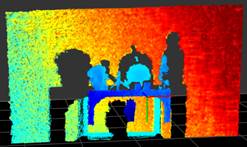
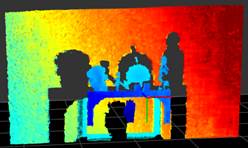
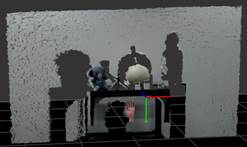
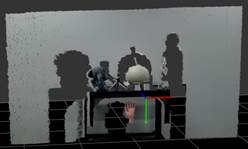
以下为典型配置参数下的开启不同滤波效果对比如下:
3.5.1
Gemini 335&330
|
配置 |
默认设置下启用的滤波: 去噪滤波 |
默认设置下启用的滤波: |
|
点云 |
|
|
|
带有RGB纹理的点云 |
|
|
3.5.2
Gemini 335L&330L
|
配置 |
默认设置下启用的滤波: 去噪滤波 |
默认设置下启用的滤波: |
|
点云 |
|
|
|
带有RGB纹理的点云 |
|
|